A B2B website is no longer a static brochure. It is your primary digital sales asset, and redesigning it requires a strategic overhaul that touches every layer of your business, from brand strategy to lead generation mechanics.
This guide walks you through a complete, milestone-based roadmap for planning and executing a B2B website redesign that delivers measurable results, not just a fresh coat of paint.
Key Takeaways
Your B2B website is now the first place buyers go to evaluate your company. A strong B2B website answers buyer questions and builds trust long before a sales rep enters the conversation. In 2026, B2B buyers want to self-educate before contacting sales, which means your redesigned website must function as a 24/7 revenue engine, not a digital placeholder.
- Most failed B2B website redesigns stem from ignoring SEO, weak information architecture, and content that does not address buyer pain points or support long, complex sales cycles. Over 40% of organic traffic can drop after a redesign without SEO planning.
- This guide provides a practical, milestone-based roadmap covering audit, strategy, AI, content, design and development, SEO, launch, and continuous optimization, with concrete 90-day and 6-month benchmarks.
- You will find two actionable checklists (milestone-based and timeline-based), plus data tables and comparison tables for platforms, approaches, and redesign outcomes.
- A website redesign without clear goals is just a design project. Long term success depends on treating your B2B website as an ongoing optimization program tied to conversion rates, pipeline contribution, and lead quality.
- B2B websites must house specific pages for buying committees, since B2B buyers typically involve six to ten decision-makers in a single purchase.
Why B2B Website Redesign Matters Now
Between 2020 and 2026, B2B buying shifted dramatically online. Gartner reports that 75% of B2B buyers prefer a rep-free sales experience during parts of the purchase journey, and when product familiarity is high, 64% of tech buyers prefer a fully digital buying process. Your website now acts as a 24/7 sales rep, and if it underperforms, your pipeline suffers.
Companies redesign their websites for several concrete reasons:
- Stagnant lead generation that no longer matches growth targets
- Misaligned messaging after a brand strategy shift or market expansion
- Dated design elements that erode first impression credibility
- A fragmented tech stack that slows marketing teams and blocks new functionality
- Mobile optimization gaps, given that 66% of B2B website traffic now comes from mobile devices
A modern B2B website in 2026 should support specific business goals: increasing demo requests by 30% in six months, improving organic traffic by 40% year over year, or shortening the sales cycle by providing better self-serve content and educational content. A redesign is also a chance to realign product positioning and content strategy with new markets, for example, expanding from SMB to mid-market.
Why Most B2B Website Redesigns Fail
Most redesigns fail not because of poor visual design but because they ignore strategy, SEO, and the actual buyer’s journey. Companies often redesign without understanding user data and analytics, leading to decisions driven by internal opinions rather than evidence. The result is a “pretty but powerless” site that does not move key metrics like SQL volume or opportunity value.
Three recurring root causes show up across 2022 to 2025 B2B case studies:
- Unclear business goals that leave teams optimizing for aesthetics instead of business outcomes
- Internal-opinion-driven decisions where executive preferences overrule conversion data, removing elements like sidebar forms or older case studies that historically converted
- Ignoring SEO during migration, which leads to dramatic organic traffic drops. SEO mistakes can lead to a 40% drop in organic traffic, as seen in documented cases where removing content without redirects dropped traffic by 97%
Treating the website like a static brochure instead of a dynamic sales and marketing system is the fastest path to underperformance. Website redesign should prioritize clarity over creative fluff.
Successful vs Failed B2B Website Redesigns
This comparison is illustrative, based on aggregated benchmarks from 2023 to 2025 B2B web design projects. It shows what happens when a redesign is strategically driven versus when it ignores fundamentals.
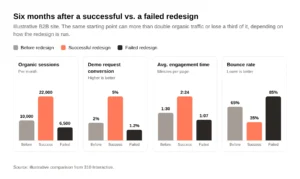
| Metric | Before Redesign | 6 Months After (Successful) | 6 Months After (Failed) |
|---|
| Organic Sessions | 10,000/month | 22,000/month (+120%) | 6,500/month (-35%) |
| Demo Request Conversion Rate | 2% | 5% (+150%) | 1.2% (-40%) |
| Average Engagement Time | 1:30 min/page | 2:24 min/page (+60%) | 1:07 min/page (-25%) |
| Bounce Rate | 65% | 35% (-30 pts) | 85% (+20 pts) |
| MQL to SQL Conversion | 20% | 30% (+50%) | 18% (slight decline) |
- These numbers are directional examples synthesized from multiple benchmark sources, not from a single client.
- A page generating 10,000 visits with zero pipeline performs poorly regardless of how good it looks.
- The difference between success and failure almost always comes down to whether SEO, content strategy, and business goals were integrated from the start.
Audit Your Current B2B Website Before You Redesign
A full audit in Week 1 to 2 of the redesign project prevents guesswork and ensures you do not discard high-performing pages by accident. Start with data, not opinions.
Quantitative audit steps:
- Review Google Analytics 4 and Search Console data from the past 12 months
- Identify the top 20 landing pages by traffic and the top 10 pages by conversion
- Flag biggest drop-off points in the funnel, from entry to demo request or contact form
- Check page load time across core pages, especially on mobile devices
- Assess current SEO equity: which URLs rank for valuable terms, and what internal links support them
Qualitative checks:
- Outdated messaging that no longer matches your brand strategy or product positioning
- Thin case studies lacking concrete, measurable results
- Confusing navigation or inconsistent branding across product pages, service pages, and pricing
- Missing trust signals like client logos, testimonials, or certifications
Build a content inventory spreadsheet listing every URL on the current site, its purpose, traffic, conversions, and recommended action: keep, update, merge, or remove. This inventory becomes the foundation for your redirect map and content strategy. Skipping it is one of the most common and costly mistakes in any redesign project.
Define Clear Business Goals and KPIs
Business goals, not aesthetics, should drive every redesign decision. A successful redesign aligns with specific measurable business goals that your C-suite actually cares about: pipeline growth, expansion revenue, or partner signups.
Start by defining targets like:
- Increase qualified lead generation by 50% in 9 months
- Double case study page engagement time within 3 months of launch
- Aim for a 30% increase in demo request conversions post-redesign
- Reduce bounce rate on solution pages by 20 points
Measure performance by pipeline contribution, not just traffic. Track how many visitors become Marketing Qualified Leads (MQLs), how MQLs convert to SQLs, and how those SQLs progress through the funnel.
| Business Goal | Website KPI | Example Target (Month 6) |
|---|
| Grow mid-market pipeline | Demo requests | 50 to 80/month |
| Improve content engagement | Avg. engagement time | +60% on pillar pages |
| Expand partner signups | Partner page conversions | 20 to 45/month |
| Increase organic reach | Organic sessions | +40% YoY |
Align with the sales team and customer success to ensure KPIs reflect real buyer pain points and sales cycle realities, not vanity metrics.
Understand Your Buyer Journey and User Personas
In complex B2B environments like manufacturing, SaaS, or healthcare, multiple stakeholders with different buyer personas touch the B2B website before purchase. B2B purchases involve multiple decision-makers that must be addressed by website content and architecture. Website design should cater to the needs of various stakeholders involved in B2B purchases.
Typical roles include:
- Economic buyer (CFO or VP Finance): focused on ROI, total cost, and risk
- Technical evaluator (CTO, IT lead): focused on integrations, security, and technical complexity
- User champion (operations or marketing manager): focused on usability and daily workflow fit
- Executive sponsor: focused on strategic alignment and competitive advantage
Map the buyer’s journey through awareness, consideration, and decision stages, then align page types and CTAs to each stage. Blog posts and thought leadership content serve awareness. Solution pages and comparison pages serve consideration. Case studies, demos, and pricing serve decision.
A 90-day journey example for a mid-market SaaS deal:
- Day 1: CTO finds a blog post via organic search about solving a specific pain point
- Day 14: Returns to explore solution pages and reads a relevant case study
- Day 30: Downloads a comparison guide, triggering a nurture sequence
- Day 50: Attends a webinar, then shares the site with CFO and operations lead
- Day 75: Operations lead explores a product page and requests a demo
- Day 90: Team evaluates pricing, reviews additional social proof, signs contract
B2B websites must navigate longer buying cycles and multiple stakeholders, and your site structure should align with buyer personas, not internal hierarchy.
Plan Your Information Architecture (IA) and Sitemap
Information architecture for a B2B website is the structural blueprint for pages, navigation, and internal linking that supports both buyers and search engines. Information architecture and SEO must dictate the framework before aesthetics in a redesign. B2B websites should prioritize clear navigation and intuitive structure.
Core page groups for most B2B sites:
- Homepage
- Solutions or product pages (by use case or capability)
- Industry-specific landing pages
- Case studies and customer stories
- Resources hub (blog, guides, webinars, educational content)
- Pricing or packaging
- About, team, and careers
- Contact and demo request
B2B websites must design for user intent rather than internal corporate structure. Include persona-specific or industry-specific landing pages to better match search intent. For example, a “Manufacturing Solutions” page performs better than a generic services page because it speaks directly to a specific audience.
SEO considerations in IA planning:
- Group content into topical clusters with pillar pages linking to supporting content
- Use descriptive URL structures that reflect the site structure
- Avoid orphan pages that search engines and users cannot find
| Page Type | Primary Audience | Buyer Stage | Primary CTA |
|---|
| Blog / Pillar Pages | All personas | Awareness | Subscribe / Download |
| Solution Pages | Technical evaluator, Champion | Consideration | Request demo |
| Case Studies | Economic buyer, Executive | Decision | Talk to sales |
| Comparison Pages | Technical evaluator | Consideration | Download comparison |
| Pricing | Economic buyer, Champion | Decision | Start trial / Contact |
A high-converting B2B site must house specific pages for buyers at every stage of the journey.
Content Strategy That Drives Lead Generation
Content is often the bottleneck in B2B website redesign projects, particularly when moving from product-centric to buyer-centric messaging. Your content strategy should map key topics and assets to each buyer stage.
Build content that addresses buyer pain points directly, using language buyers actually use in search and conversations rather than internal jargon. B2B websites must also optimize for AI search to generate leads, which means structuring content with clear answers, headers, and schema markup that AI-powered search tools can parse.
Fresh case studies with concrete results are incredibly important. Focus on numbers like “400% more leads in 6 months” or “59% higher engagement time.” These create credibility that generic claims never will. Case studies should focus on measurable results to persuade buyers.
| Content Type | Buyer Stage | Primary Goal | Suggested KPI |
|---|
| Blog posts, guides | Awareness | Organic traffic, brand reach | Sessions, time on page |
| Solution overviews | Consideration | Engagement, nurturing | Page views, CTA clicks |
| Case studies | Decision | Conversion, trust | Demo requests, downloads |
| Comparison pages | Consideration | Differentiation | Time on page, CTA clicks |
| ROI calculators | Decision | Lead generation | Form completions |
Design Elements That Improve Conversion Rates
Modern B2B web design focuses on clarity, trust, and guided action rather than flashy animations that slow down pages. The value proposition must be clear within three seconds of landing on the homepage.
Key design elements that support conversion:
- Clear value proposition in the hero section with a single, focused message
- Prominent and persistent CTAs that drive users toward demo requests or contact forms
- Clean layouts with scannable sections and strong visual hierarchy
- Testimonial carousels, logo walls, and security badges that serve as trust signals
- Above-the-fold case study snippets with quantifiable outcomes
- Responsive design that works across all screen sizes, since over 60% of B2B website traffic now comes from mobile devices, and mobile optimization is essential as many B2B buyers frequently research on the go
Avoid overusing heavy animations and video backgrounds. Fast loading performance is crucial for B2B website conversion rates. Compress images, minimize scripts, and test page load time on real devices. 16% of the global population has some form of disability, so accessible design is not optional.
A redesign should focus on building user trust throughout the buying process. Visual identity and logo design matter, but only in service of clarity. Your digital presence should convert visitors, not just impress them
Technical Platform and CMS Choices
Choosing the right CMS is a strategic decision affecting page speed, security, editorial agility, and integration with CRM and marketing tools. The wrong choice can bottleneck your marketing teams for years.
Common B2B CMS options include WordPress, Webflow, and headless setups. Each handles scalability, design control, and team autonomy differently. Native SEO controls, robust form handling, and integrations with tools like HubSpot, Salesforce, or Marketo are non-negotiable when selecting a platform.
| Factor | WordPress | Webflow | Headless CMS |
|---|
| Editor UX / Autonomy | Good for basic use; advanced edits need dev | High autonomy for marketers and designers | Lower autonomy unless investing in preview tools |
| SEO Capabilities | Very strong via plugins or code | Strong built-in; clean markup | Very strong if front-end built well |
| Performance & Speed | Variable; depends on theme and plugins | Clean by default; CDN, compressed assets | Very high potential; depends on setup |
| Security Surface | Plugins are risk points; hosting matters | More controlled environment | Fewer legacy attack vectors |
| Typical TCO | Lower initial cost; grows with scale | Higher subscription; fewer hidden costs | Higher technical cost up front |
Modern, modular design systems in the CMS make it significantly easier for non-technical team members to update content post-launch, reducing reliance on developers for everyday changes. This saves time and keeps your site current without constant dev cycles.
Common B2B CMS Platforms
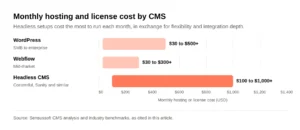
| CMS | Ideal Company Size | Marketing Team Autonomy | SEO Capabilities | Monthly Hosting/License Range | Best For |
|---|
| WordPress | SMB to Enterprise | Medium (needs dev for complex changes) | Very strong (plugin ecosystem) | $30 to $500+ | Content-heavy sites with plugin-driven flexibility |
| Webflow | Mid-market | High (visual editor, no-code) | Strong (clean markup, built-in tools) | $30 to $300+ | Design-forward B2B companies wanting speed and control |
| Headless (Contentful, Sanity, etc.) | Mid-market to Enterprise | Low to Medium (depends on tooling) | Very strong (if front-end optimized) | $100 to $1,000+ | Complex integration needs, omnichannel content delivery |
- A Series B SaaS company wanting speed and designer-led iteration often thrives on Webflow.
- A regional manufacturer with a large content library and SEO focus may benefit from WordPress with managed hosting.
- An enterprise with complex CRM automation, multilingual needs, and custom integrations should evaluate a headless stack.
- Final choice should factor in internal IT policies, compliance, and procurement requirements. The best tech stack is the one your team can actually maintain.
Source: platform comparison data aggregated from Sensussoft CMS analysis and industry benchmarks.
SEO Strategy: Avoid “Ignoring SEO” During Redesign
Ignoring SEO during a redesign is one of the most expensive mistakes you can make. Losing 30 to 50% of organic traffic is common when redirects and on-page optimization are neglected. Technical SEO foundations should be fixed during redesigns, not after.
Pre-launch SEO tasks:
- Conduct keyword research and map target terms to new pages using an SEO plan
- Plan 301 redirects for every URL that changes, based on your content inventory
- Maintain or improve internal linking structures to preserve SEO equity
- Review and update schema markup for FAQs, articles, and product pages
On-page SEO best practices for B2B websites:
- Write keyword-rich yet human headlines and structured subheadings
- Create descriptive meta tags for every core page
- Optimize images: compress images, use descriptive alt text, and serve modern formats
- Add schema markup to help search engines and AI tools understand your content
Technical SEO checklist:
- Test page load time and aim for sub-3-second loads on mobile devices
- Ensure responsive design across all breakpoints
- Resolve duplicate content or thin pages before launch
- Verify crawlability with no blocked resources or broken internal links
- Submit updated sitemap to Google Search Console on launch day
According to Ahrefs B2B SEO data, organic search remains a top discovery and pipeline channel with an average conversion rate around 5% and lower cost per lead than paid search.
Example SEO and Engagement Improvements After Redesign
This table reflects a hypothetical composite of B2B sites that combined strong content strategy, technical SEO, and UX updates in 2024 to 2025.
| Metric | Before Redesign | 6 Months After | Change |
|---|
| Users | 8,500/month | 18,700/month | +120% |
| Organic Search Sessions | 5,200/month | 11,400/month | +119% |
| Engaged Sessions | 3,100/month | 7,200/month | +132% |
| Average Engagement Time | 1:15 min | 2:00 min | +60% |
| Bounce Rate | 68% | 42% | -26 pts |
| Leads (Demo Requests + Downloads) | 40/month | 200/month | +400% |
- A 50%+ growth in organic sessions means your new website is attracting qualified users who previously could not find you, directly feeding the top of your sales pipeline.
- A double-digit bounce rate decrease signals that visitors are finding key information and engaging with your content rather than leaving immediately.
- These numbers are representative, not client-specific, but they reflect the scale of impact a strategic website redesign can have when SEO is integrated from day one.
Buyer Journey, Conversion Paths, and Lead Generation Mechanics
High-performing B2B websites treat every key page as a step in a conversion path, with clear next actions aligned with the buyer stage. A high-performing site effectively screens unqualified traffic while guiding qualified visitors toward deeper engagement.
Set up content by funnel stage:
- Top-of-funnel: guides, blog posts, webinars, and thought leadership to drive users to the site
- Mid-funnel: case studies, solution overviews, and comparison pages that address different buyer personas
- Bottom-of-funnel: demo requests, pricing conversations, trials, and strategy calls
Use progressive profiling and multi-step forms to reduce friction. Reducing form fields in lead capture can streamline the process and improve conversion rates. Instead of asking for 10 fields upfront, capture email and company on first touch, then enrich data over subsequent interactions.
Route form submissions into CRM and marketing automation workflows to trigger tailored nurture sequences based on content consumed. This ensures the sales team receives context-rich leads, not cold contacts.
Examples of high-intent CTAs:
- “Book a 30-minute strategy call” (bottom-of-funnel, sales-qualified)
- “Schedule a demo this week” (bottom-of-funnel, product-qualified)
- “Download the 2026 Buyer’s Guide” (mid-funnel, marketing-qualified)
Enterprise buyers have high skepticism and require removal of buyer friction at every step. Make it easy for visitors to take the next logical action without hunting for it.
Case Studies and Social Proof: Turning Proof Into Pipeline
B2B buyers need evidence, not promises. A website redesign should incorporate relevant social proof like client logos and case studies throughout the site, not just on a dedicated page.
Strong case study elements include:
- Client profile (industry, size, challenge)
- The solution implemented
- Concrete, measurable results (e.g., “+123% users,” “400% more leads,” “59% higher engagement time”)
- A clear narrative tying outcomes to your offering
Where to place social proof on your redesigned website:
- Homepage hero and near primary CTAs
- Solution pages and service pages to reinforce relevance
- Pricing page to reduce last-minute hesitation
- Resource download pages to support micro-decisions
Use industry-specific proof so visitors in manufacturing, SaaS, or healthcare see themselves in the stories. This increases relevance and trust for decision makers evaluating your offering.
Updated case studies support long term success by staying aligned with evolving services and markets. Review and refresh them quarterly.
Milestone-Based B2B Website Redesign Checklist
This checklist provides a practical, milestone-based framework that teams can follow from initial audit through launch. It is designed for teams with limited internal bandwidth and can be used to brief agencies or internal stakeholders.
Discovery and Audit
- Complete a full content inventory of all URLs, traffic, and conversions
- Review Google Analytics 4 and Search Console data from the past 12 months
- Benchmark current conversion rates, bounce rate, and organic traffic
- Conduct competitor analysis on site structure and messaging
- Align on primary business goals and KPIs with leadership
Strategy and IA
- Finalize buyer personas and map the buyer’s journey
- Approve sitemap and information architecture
- Define content cluster plan with pillar and supporting pages
- Lock URL structure and navigation hierarchy
Content Production
- Write or update copy for all core pages (homepage, solutions, about, contact)
- Create new case studies with detailed information and measurable outcomes
- Develop product pages and service pages copy aligned to buyer stage
- Produce educational content for resource hub (guides, FAQs, blog posts)
UX and Visual Design
- Design mockups for key conversion flows (homepage to demo request)
- Test visual hierarchy, CTA placement, and mobile responsiveness
- Finalize component library and design system for post-launch use
- Validate that visual identity and brand elements are consistent
Development and Integration
- Build on chosen CMS with all approved templates and components
- Configure CRM and marketing automation integrations
- Set up analytics tagging, event tracking, and goal configuration
- Implement form flows and lead routing logic
SEO and QA
- Finalize 301 redirect map for all legacy URLs
- Validate on-page SEO: meta tags, headings, schema markup, image optimization
- Test page load time, mobile responsiveness, and accessibility
- Run full crawl to identify broken links, duplicate content, and orphan pages
Launch and Optimization
- Deploy to production during a lower-traffic window
- Monitor analytics daily for the first two weeks
- Fix 404 errors, adjust redirects, and refine CTAs based on early user behavior
- Plan first round of A/B tests for high-traffic pages
Timeline-Based B2B Website Redesign Checklist (90 to 180 Days)
A realistic timeline for a mid-sized B2B website redesign is typically 12 to 24 weeks depending on content scope and integrations. Here is a time-boxed structure for planning.
Weeks 1 to 3: Audit and Strategy
- Complete content and URL audit
- Review 12 months of analytics and identify top-performing pages
- Align stakeholders on business goals and KPIs
- Begin buyer persona research and competitive analysis
Weeks 4 to 7: IA and Content Planning
- Lock final sitemap by end of Week 4
- Approve information architecture and navigation structure
- Begin writing copy for top 20 pages by priority
- Have first draft copy for all core pages by Week 7
Weeks 8 to 11: Design
- Complete homepage and key landing page mockups
- Design responsive layouts for all page templates
- Test CTA placement and visual hierarchy with internal stakeholders
- Finalize design system and component library
Weeks 12 to 16: Development, Integrations, and QA
- Build all templates in the chosen CMS
- Integrate CRM, marketing automation, and analytics tools
- Content approvals must be done before design sign-off
- Run full QA: cross-browser, mobile, performance, accessibility
Weeks 17 to 18 (or 20 to 24 for larger sites): Launch and Optimization
- Redirect map must be final before launch window is chosen
- Deploy and monitor traffic, conversions, and errors daily
- Fix broken links, slow pages, and redirect issues within 48 hours
- Begin post-launch A/B testing on highest-traffic pages
One-Time Redesign vs Ongoing Optimization Program
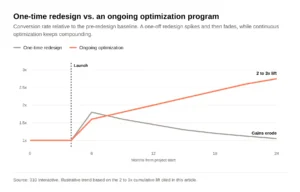
Long-lived B2B websites treat launch as “Day 1,” not the finish line. Here is how the two approaches compare.
| Factor | One-Time Redesign | Ongoing Optimization Program |
|---|
| Typical Timeline | 3 to 6 months, then done | Continuous (monthly/quarterly cycles) |
| Pros | Clear scope, defined budget, visible transformation | Sustained growth, faster adaptation, compounding gains |
| Cons | Performance plateaus after 3 to 6 months; site ages quickly | Requires ongoing budget and team commitment |
| Impact on Conversion Rates (12 to 24 months) | Initial spike, then gradual decline | Steady improvement, 2 to 3x cumulative lift |
| Impact on Lead Generation (12 to 24 months) | Gains erode as content and UX stagnate | Gains compound as content, UX, and SEO improve |
- Ongoing optimization is more cost-effective over a 3-year horizon because it reduces the need for full redesigns every 3 to 5 years.
- Quarterly A/B tests, content updates, and SEO adjustments keep your site aligned with evolving buyer needs and search engine algorithms.
- Budgeting for a post-launch optimization phase in 2026 is not optional. It is the difference between a new website that ages gracefully and one that becomes a liability within 18 months.
- Continuous testing and optimization should follow a website redesign launch to protect your investment.
Post-Launch Optimization and Long-Term Success
The first 90 days after launch are critical. This is when you stabilize SEO performance, validate UX assumptions, and fine-tune conversion paths based on real user data.
Immediate post-launch tasks:
- Monitor analytics daily for traffic and conversion anomalies
- Fix 404 errors and adjust redirects as Search Console flags issues
- Refine CTAs based on actual user behavior and heatmap data
- Validate that form submissions are routing correctly to CRM workflows
Ongoing quarterly activities for long term success:
- Update case studies with new client results and fresh data
- Add new resource content (guides, blog posts, webinars) to keep the site growing
- Revisit keyword research and refresh on-page SEO for top pages
- Run A/B tests on high-traffic pages and forms to continuously improve conversion rates
- Gather feedback from sales, customer success, and marketing teams on content gaps, buyer objections, and feature adoption
- Review site structure and navigation based on user flow data
- Audit page load time and compress images as new content is added
Your digital presence is a living system. The companies that treat their B2B website as an ongoing program, not a finished design project, are the ones that create sustainable pipeline growth and long term success.
FAQ
These FAQs address practical questions not fully covered in the main guide, with concise answers for busy B2B marketers and founders.
How much does a B2B website redesign typically cost in 2026?
Small B2B sites with a few dozen pages and limited integrations typically invest $25,000 to $60,000. Mid-market and multi-language sites with a full content overhaul run $60,000 to $150,000. Complex enterprise platforms with custom integrations, heavy content volume, and compliance requirements often exceed $150,000. Cost is heavily influenced by content creation, custom development, and SEO work. Investing properly tends to pay back through higher-quality lead generation and improved conversion rates over 12 to 24 months.
How often should we redesign or significantly update our B2B website?
Full redesigns typically happen every 3 to 5 years, but high-performing B2B teams run continuous improvements with UX tweaks, content refreshes, and SEO updates happening monthly or quarterly. This approach avoids the costly cycle of major overhauls. At minimum, conduct a strategic review once a year to ensure the site still aligns with business goals, product roadmap changes, and evolving buyer pain points.
How can we avoid losing SEO rankings and organic traffic during a redesign?
Start with a thorough content and URL audit. Build a complete 301 redirect plan that covers every URL changing or being removed. Preserve or improve internal links, and maintain on-page optimization for all key pages. Launch during a lower-traffic period if possible. Closely monitor Google Search Console and analytics for 4 to 8 weeks post-launch, and fix broken links, slow pages, or redirect issues immediately. Protecting your SEO equity is not a nice-to-have. It is the difference between growth and a 40% traffic drop.
What is the best way to localize a B2B website for international audiences?
Start by identifying priority markets based on revenue potential. Create localized versions of high-intent pages like solution pages, pricing, and case studies with native-level language and region-specific proof points. On the technical side, implement hreflang tags, choose a local domain or subfolder strategy, and support local currencies and formats. This improves both UX and SEO in target regions while giving your digital presence credibility with local decision makers.
Should we add AI tools like chatbots or personalization during the initial redesign?
AI-powered chat, guided product selectors, or personalized content blocks can support buyer journeys, but they should be added only after core UX, content, and analytics foundations are solid. Pilot AI features on specific high-value pages, measure impact on engagement and conversion, and expand only if data shows meaningful improvements. Adding AI just because it is trendy creates complexity without value. Get the fundamentals right first, then layer in new functionality strategically.