How To Build B2B Service Pages That Qualify Prospects
Most B2B companies treat their service pages like digital brochures. They describe what the company does, sprinkle in some jargon, and slap a “Contact Us” button at the bottom. The result? A flood of inquiries from people who will never buy, and a sales team buried in discovery calls that go nowhere.
This guide walks you through how to build B2B service pages that qualify prospects before they ever reach your sales rep. You will learn how to define your buying audience, structure copy around real sales questions, add proof that filters for fit, and connect every page to a system that measures lead quality instead of just volume.
Key Takeaways
- Clarify in the hero section exactly who the service is for, what business problem it solves, and the next step, so unqualified visitors exit quickly and high-fit prospects lean in.
- Structure each B2B service page around buyer questions from the real sales process, using specific proof, numbers, and client context to filter for qualified leads.
- Use quick visual credibility at the top (logos, certifications, numbers) plus detailed case studies and pricing signals mid-page to support buyer intent and reduce time-wasting inquiries.
- Design enquiry forms, CTAs, and CRM handoff around qualification, not volume, so your sales team spends time on prospects with budget, problem-fit, and realistic timelines.
- Instrument every service page with analytics that track lead quality by source, message, and offer, then iterate layout, copy, and offers to steadily improve qualified pipeline.
Why Most B2B Service Pages Don’t Qualify Prospects
Unqualified inquiries are expensive. Every poor-fit call eats 30 to 60 minutes of a sales rep’s day, and when you multiply that across a team, you are losing thousands of dollars in productive selling time each month. “More leads” is not a strategy when half of those leads have no budget, no authority, or no real problem to solve. What your B2B website needs is not more traffic but better-matched visitors entering the sales process.
Generic service page copy is the biggest culprit. Phrases like “end-to-end solutions” and “best-in-class” sound impressive but tell a buyer nothing about who the service is actually for or what outcome to expect. This broad language attracts broad traffic and fails to screen for budget, fit, or readiness.
Here are the most common failure patterns seen across B2B sites in 2024 through 2027:
- Unclear service scope with no detail on what is included versus what is not
- No pricing signals, leading to inquiries from prospects with budgets far below your minimum
- Weak social proof with unsupported marketing claims or testimonials buried at the bottom
- Generic CTAs that push every visitor to “Contact us” regardless of where they are in the buying process
High-intent traffic still bounces when pages lack quick visual credibility, specific outcomes, and clear next steps. Every additional second of page load time drops conversion rates significantly, compounding the problem further for slow or cluttered pages.
The fix is to turn the service page into a qualifying asset that mirrors how your sales team actually evaluates prospects. The rest of this article shows you how.
Define The Buying Audience And Qualification Criteria Before You Write
Qualification starts before design, before copywriting, and before web development. You need to know which companies and roles your service page should attract and which ones it should politely turn away. Clearly defining the ideal customer profile improves lead qualification on service pages and prevents misalignment downstream.
Identify the roles involved in the buying process. Different stakeholders ask different questions during purchases. A VP of Operations wants to know about ROI and time-to-value. A Head of IT asks about technical capabilities and platform compatibility. A Procurement Manager cares about pricing, contract terms, and compliance. Tailor content to match specific buyer personas’ needs and you will see the difference in lead quality immediately.
Audience research should produce concrete qualification criteria:
- Minimum deal size or annual contract value
- Industries and verticals you have proven results in
- Tech stack compatibility (platforms, APIs, infrastructure)
- Geography and regulatory requirements
- Contract type preferences (retainer, project, pilot)
| Criteria |
Ideal Client Profile |
Non-Ideal Client Profile |
| Budget / ACV |
$10,000 to $50,000+ annually |
Below $5,000 or undefined |
| Team size |
20 to 500+ employees with internal decision makers |
Sole proprietors or very small teams |
| Urgency |
Needs solution within 1 to 3 months |
Exploring casually with no timeline |
| Tech maturity |
Running modern cloud infrastructure (AWS, Azure) |
Legacy systems you cannot integrate with |
| Location |
Regions where you hold certifications and can operate |
Outside your serviceable geography |
These criteria directly inform copy decisions. If your minimum engagement is $30,000, your headline should reference “mid-market” or “enterprise.” If you only serve healthcare and fintech, name those industries in the first paragraph.
Craft A Short, Descriptive Hero That Passes The “Backyard BBQ” Test
Here is a quick test for your service page hero: describe what your company does at a backyard barbecue. If the person across from you looks confused, your headline needs work. A non-expert should understand who you serve and what problem you solve in a few words. Creating effective B2B service pages requires clear messaging that identifies the service and its target audience, and the header’s job is to deliver that clarity in five seconds or less.
A service page should have a short, descriptive headline. A clear headline should state the outcome and audience, not your internal methodology or mission statement. Compare these:
- Good: “Managed Kubernetes for Healthcare SaaS Teams”
- Bad: “Enterprise Cloud Excellence”
The second tells you nothing about the target audience, the problem, or the outcome. The best service pages use simple words, multiple images, and a primary CTA that leaves no doubt about what to do next. Include a short subhead with a timeframe or quantified outcome, one primary CTA, and optionally a secondary “learn more” link for lower-intent visitors.
| Aspect |
Clarity-First Hero |
Jargon-Heavy Hero |
| Bounce rate |
Lower because visitors immediately relate |
Higher because visitors cannot determine fit |
| Buyer intent match |
High, names audience and outcomes |
Low, vague promises confuse everyone |
| Average form submissions |
Higher with clear, specific CTA |
Lower due to diluted messaging |
| Time to action |
Faster since visitors feel confident |
Slower or abandoned entirely |
Keyword Focus And Search Intent: Attract Visitors You Might Actually Work With
Keyword choice determines who lands on your service page and what problems they expect you to solve. SEO strategies for B2B service pages should focus on high-intent keywords relevant to specific problems and industries. Service pages often target commercial intent keyphrases, not broad educational terms.
Understand the difference. An educational keyword like “how to improve warehouse throughput” attracts researchers at the top of the funnel. A commercial intent service phrase like “warehouse automation consulting services” attracts buyers who are closer to engaging. Keyword focus service pages should prioritize the latter.
Select one primary phrase as your target, then add 5 to 10 semantically related phrases to support semantic SEO. For instance, if your primary phrase is “cloud security consulting services,” your many semantically related phrases might include “cloud compliance audit,” “security architecture review,” and “managed detection and response.” Service pages should incorporate relevant keywords for SEO, but avoid stuffing. Related words and both the target phrase and its variations should flow naturally.
| Keyword |
Search Intent |
Typical Role |
Recommended CTA |
| “Cloud security consulting services” |
Commercial / decision stage |
CISO or Head of Security |
“Schedule a consult” |
| “Cloud security threats 2027 report” |
Educational / awareness |
Security analyst |
“Download report” |
| “Cloud security implementation costs” |
Budget comparison |
CFO or IT Procurement |
“Get pricing” |
A well-planned B2B service website has an entire sitemap optimized for search, not just individual pages. Use Google Search Console to monitor which queries deliver visitors and refine based on search results performance.
Quick Visual Credibility: Prove You’re Safe To Shortlist In Three Seconds
Buyers skim. You have roughly three seconds to establish trust before they scroll or bounce. Quick visual credibility at the top of the page is what separates pages that convert from pages that get abandoned.
Client logos build trust instantly on service pages. Place logos of recognizable clients, awards, partnerships, certifications, and core statistics directly under the hero. A credibility strip with “98% on-time go-lives since 2022” or “Serving 200+ mid-market companies” creates an immediate sense of safety. Pages with credible social proof placement convert 12 to 34% higher than pages without.
| Trust Signal Type |
What It Proves |
Best Placement |
| Client logos / notable clients |
Peer validation, experience |
Just under hero in a horizontal band |
| Certifications / security badges |
Technical competence, safety |
Near hero or “Why choose us” section |
| Quantified outcomes (metrics, years) |
Results, reliability |
Mid-page near case studies, repeated near CTAs |
This section should visually feel like a band across the page with minimal text and strong brand visuals. Think of it as a trust handshake before the visitor reads a single paragraph. Social proof shows others have chosen your brand, and that is often enough to keep scan readers scrolling. Note that core web vitals and page speed matter here too. A slow-loading credibility strip defeats its own purpose.
Structure The Service Page Around Buyer Questions, Not Internal Departments
Visitors mentally run a checklist of sales questions. Imagine them silently asking: “Is this for companies like mine?” “What results can I expect?” “How risky is this?” Effective service pages answer top sales questions directly. A well-structured service page guides visitors from problem recognition to trust-building and conversion.
Each major on-page section should be treated like chapters in a sales conversation, progressing logically from fit to action.
| Buyer Question |
Section Heading |
| Is this for companies like mine? |
“Who We Work With” |
| What specific problems do you solve? |
“Problems We Solve” |
| What results can I expect? |
“Business Outcomes and Case Studies” |
| How does the process work? |
“Our Process” |
| What does this cost or what are the trade-offs? |
“Investment and Fit” |
| What support will we have? |
“What You Can Expect From Us” |
| What is the next step? |
“Get Started / Book a Fit Assessment” |
Align pages to these questions and you will naturally create a conversion path that guides visitors toward a decision without forcing them.
Design Content For A Longer B2B Buying Journey With Educational Content
Most B2B sales cycles span 3 to 6 months. Multiple stakeholders revisit the same service page at different stages. Multiple decision makers from legal, finance, operations, and IT each bring their own questions and timelines. B2B websites should support multiple buying journeys, not just a single “learn and convert” path.
Weave in educational content such as guides, comparison pages, calculators, and recorded webinars as next steps from the service page. Internal links should move visitors between awareness, consideration, and decision content, using the right content types for each buyer journey stage.
| Funnel Stage |
Page Types to Link To |
Best CTA |
| TOFU (Early) |
Blog posts, industry reports, trend guides |
“Download the guide” |
| MOFU (Mid) |
Comparison pages, webinars, case studies |
“Watch the webinar” |
| BOFU (Decision) |
Pricing pages, demo request, fit assessment |
“Request a proposal” |
The more educated the visitor, the more likely they are to convert as a qualified lead. The goal is to generate leads who are informed and closer to fit, rather than inflating form submissions with cold, early-stage visitors.
Show Who It’s For (And Who It Isn’t) To Qualify Prospects Fast
Clarity about fit is a time-saver for both buyers and your sales team, especially for complex or premium service offerings. Service pages should include specific details to qualify prospects. Transparent qualification criteria help prevent misaligned discovery calls by outlining specific requirements.
Create a dedicated “Who we work with” section that lists industries, team sizes, tech stack compatibility, and project types that are a strong match. Then add a “Not a fit if…” bullet list:
- Annual budgets below $10,000 for this service
- Companies seeking one-off tasks rather than ongoing partnership
- Platforms we do not support (e.g., on-premise legacy systems)
- Organizations without internal project ownership or decision authority
- Looking for a DIY solution rather than a managed or high end service
This section reduces discovery call time by pre-answering fit questions and raises average opportunity size.
| Factor |
Right-Fit Prospect |
Poor-Fit Prospect |
| Goal |
Solve a defined business problem with measurable ROI |
Exploring with no clear objective |
| Timeline |
Ready to engage within 1 to 3 months |
No urgency, 12+ months out |
| Budget |
Matches or exceeds stated minimums |
Significantly below minimums |
| Decision process |
Has internal sponsor and authority |
No decision-maker involvement |
| Expectations |
Understands collaborative process |
Expects overnight results |
Explain The Service Clearly: Problems, Outcomes, And Process
A service page must describe concrete business outcomes, not internal methodologies or vague frameworks. B2B service pages should be 800 to 1000 words long for effectiveness, focused tightly on what matters to the buyer.
Start with the problems you solve. Use real operational language: “missed SLAs,” “failed integrations,” “rising operational costs,” “compliance gaps.” These pain points resonate because they mirror the language buyers use internally when describing their challenges.
Then describe business outcomes. Use quantified metrics and case studies to show what previous clients achieved. “32% reduction in onboarding time,” “$200K saved in year one,” or “Full compliance achieved in 90 days” are far more powerful than “we help you improve efficiency.”
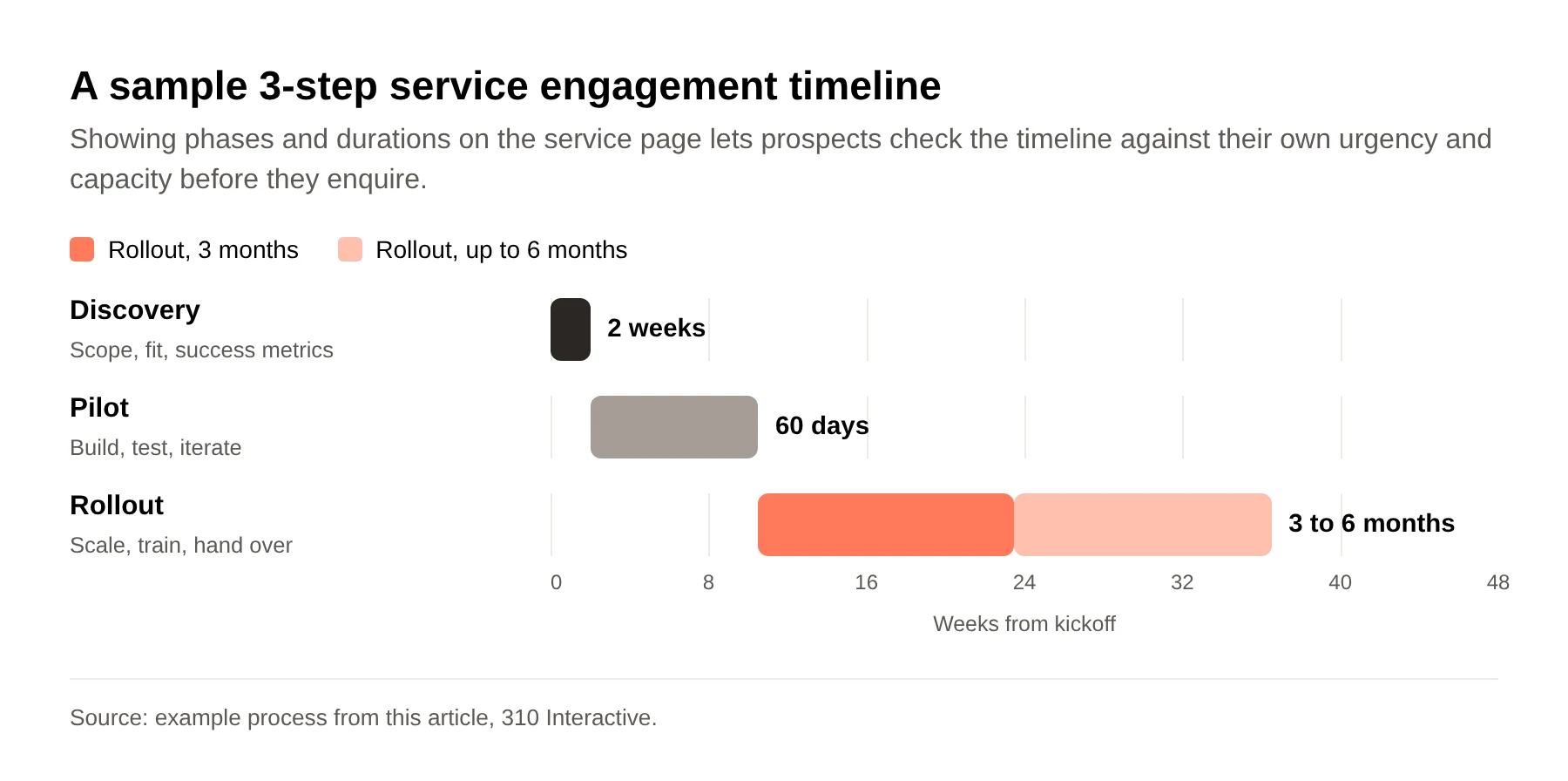
Providing a clear explanation of your process can help prospective clients understand engagement expectations. A simple 3-step process works well:
- Discovery (2 weeks): define scope, validate fit, identify success metrics
- Pilot (60 days): build, test, and iterate with your team
- Rollout (3 to 6 months): scale, train, and hand over with ongoing support
Describing timeframes, dependencies, and client responsibilities helps prospects self-qualify based on their internal capacity and urgency.
Use Social Proof And Data To Pre-Qualify Serious Buyers
Testimonials and case studies should do double duty: build trust and signal which types of organizations get the best results. Testimonials transform marketing into social proof. Social proof should appear throughout your entire site, not just on a single testimonial page.
Include at least two types of proof: short testimonials with role and company size, and 1-page success stories with quantifiable outcomes. If you lack written success stories, B2B content marketing services can turn client results into proof assets your buyers trust. The best testimonials often include their own little headlines that summarize the result. Using quantified metrics and case studies enhances credibility and demonstrates the service’s value.
| Aspect |
Generic Testimonial |
Qualification-Oriented Testimonial |
| Specificity |
“Great to work with!” |
“Reduced our onboarding cycle from 6 weeks to 9 days” |
| Client context |
No company size, role, or industry |
“VP Operations at a 200-person logistics firm” |
| Measurable result |
None |
“32% reduction in onboarding time over 9 months” |
| Qualification signal |
Tells you nothing about fit |
Tells similar companies they can expect similar results |
Include concrete dates such as project results. Clients, awards, partnerships, certifications should all be visible in relevant sections. Social proof placement matters: place proof near CTAs, so buyers see evidence right when they decide whether to book a call. Not every competitor will invest this level of effort, which is exactly why it works.
Calls To Action And Offers That Match Buyer Intent
The same service page must support multiple buyer intent levels. A first-time visitor from a search results page is in a different place than someone returning for the third time after sharing the page with their CFO. Effective CTAs should match the visitor’s buying intent, which is why it pays to map content to B2B buyer intent across the whole site. Sales pages without CTAs often lead to dead ends, and a compelling CTA triggers demand and invites engagement.
Define at least three CTA types:
| CTA Type |
Best Used When |
Example Button Copy |
| Low-friction |
Visitor is researching, early stage |
“Download the comparison checklist” |
| Mid-friction |
Visitor is evaluating, comparing providers |
“Book a 30-minute fit assessment” |
| High-friction |
Visitor is ready to buy or shortlist |
“Request a custom proposal” |
CTAs should use descriptive wording like “Discuss your requirements” rather than vague “Submit” or “Learn more.” Set expectations on next steps: “Get a 30-minute fit assessment within 2 business days” reassures prospects who fear aggressive sales pressure. A high-converting page typically has a CTA near the bottom as well as above the fold. A free consultation offer can work well for mid-friction scenarios but should still set clear expectations.
These CTAs directly influence the quality of leads entering the sales process, not just total conversion rates.
Keep Enquiry Forms Focused On Qualification, Not Interrogation
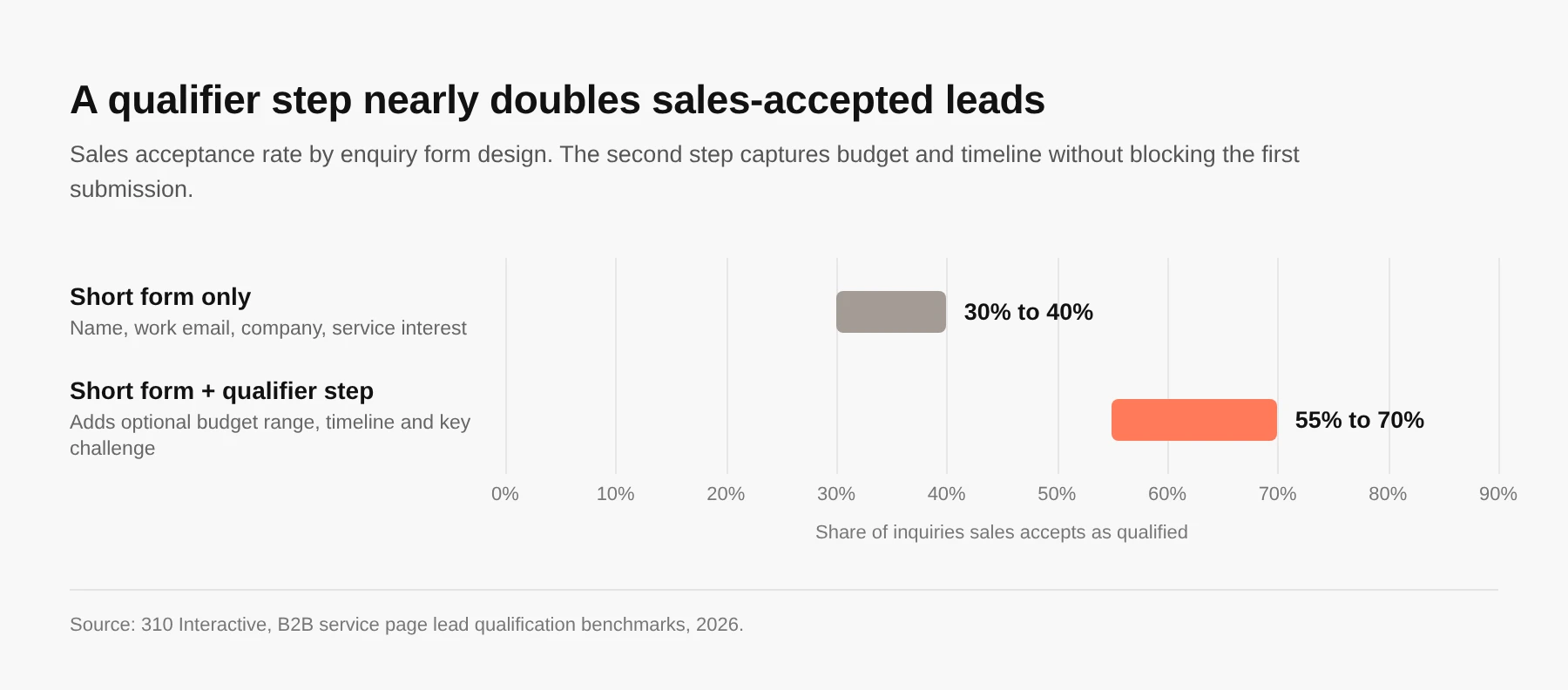
Each additional form field reduces conversion by roughly 4%. But removing all qualification questions creates more unqualified leads for your sales team. The answer is balance: low friction forms that still capture enough information to score and route leads.
Use a 2-step approach: a short initial form (name, work email, company, service interest) followed by optional qualifiers like budget range, timeline, and key challenge.
| Metric |
Short Form Only |
Short Form + Qualifier Step |
| Completion rate |
Higher (fewer fields = less form friction) |
Slightly lower overall |
| Average lead quality score |
Lower (missing context) |
Higher (budget, timeline captured) |
| Sales acceptance rate |
30 to 40% |
55 to 70% |
Form UX essentials:
- Clear labels with no ambiguous fields
- Mobile device friendly layout (B2B traffic is now over 50% mobile)
- Visible privacy information
- Confirmation message that explains what happens next and when
Form submissions should carry page context (which specific service page and CTA) into the CRM to support downstream qualification and lead capture accuracy.
Connect The Service Page To CRM, Lead Scoring, And Sales Workflows
Your service page is the start of a data trail, not an isolated marketing asset. Marketing automation and CRM integration turn page interactions into actionable intelligence for the sales team.
Capture key context in the CRM: originating URL, campaign source, service selected, buyer role (if captured), and stated timeline. These data points fuel a simple lead scoring model based on on-page behavior (scroll depth, repeat visits, asset downloads) and form inputs.
Practical routing rules make a difference:
- Enterprise inquiries (budget $50K+, 200+ employees) route to senior account executives
- Mid-market leads route to inside sales for faster follow-up
- Early-stage visitors who only download content enter nurture sequences
Marketing teams and sales teams must close the loop. The sales rep should report back on lead quality from each page and CTA. This feedback helps you know which messages and offers generate the best qualified leads and which ones waste pipeline capacity.
Measure Lead Quality, Not Just Conversion Rate
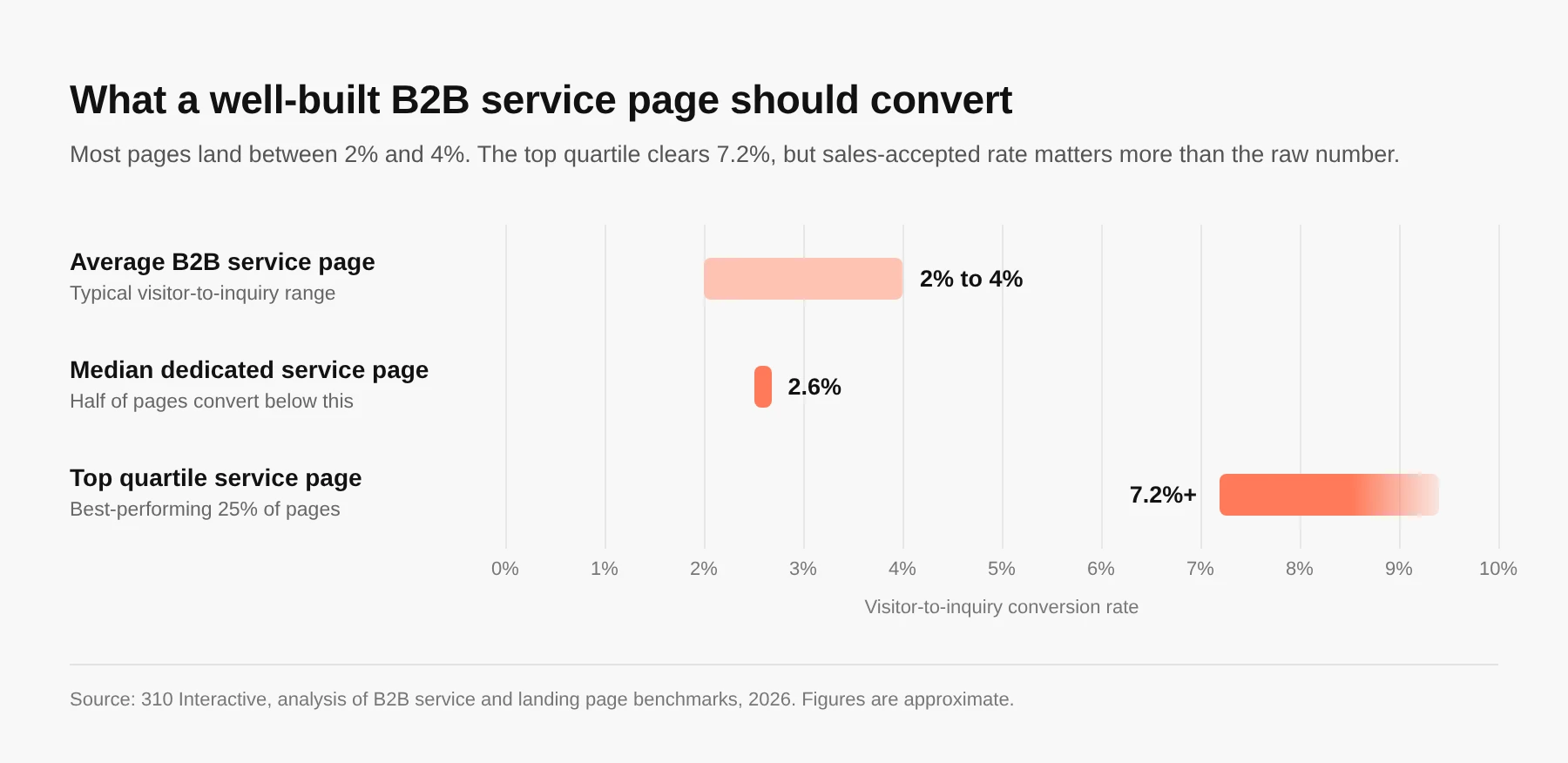
There is a meaningful difference between top-of-funnel performance metrics like click-through rate and form submissions, and downstream sales metrics like qualified opportunity rate and win rate. High-performing B2B websites convert between 2% and 4% of visitors, but the real question is how many of those conversions become revenue. Our breakdown of B2B website KPIs shows how to tie each metric to pipeline.
Track these KPIs for each service page:
- Visitor-to-inquiry conversion rate
- Qualified lead percentage (inquiries that become sales-accepted)
- Meetings booked per 100 visitors
- Average deal size from leads originating on this page
- Time to first response
- Win rate (SQL to closed-won)
| Metric |
What It Tells You |
How It Influences Optimization |
| Visitor to inquiry % |
Is page copy and CTA effective? |
Improve hero clarity, CTA wording |
| Inquiry to SQL % |
Are inquiries good quality? |
Add qualification steps, “who not for” section |
| Average deal size |
Does the page attract right-size clients? |
Tighten ICP, improve proof for larger deals |
| Time to response |
Impacts perception and lead drop-off |
Assign clear handlers, automate alerts |
| Win rate |
Overall alignment between promise and delivery |
Adjust messaging-promise fit |
Review data monthly to catch changes in traffic mix and buyer behavior. Small copy or offer changes on a high performing page can be A/B tested to improve qualified lead rate without increasing ad spend.
Examples Of Page Elements That Filter For Qualified Leads
Seemingly small content elements like minimum engagement levels or tech prerequisites can sharply improve lead relevance. These are not about being exclusionary. They are about respecting both the buyer’s time and your team’s capacity.
Here are concrete examples of qualifying elements woven into natural copy:
| Element on Page |
How It Qualifies or Disqualifies |
| “Typical project investment starts at $40,000” |
Filters out low-budget inquiries |
| “We partner best with teams of 20+ people” |
Signals that very small companies are not the target audience |
| “We only support AWS and Azure environments” |
Disqualifies mismatched tech stack leads |
| “Expect a 3-month minimum engagement” |
Filters out those seeking overnight solutions |
| “Not a fit if you need only the formatting of reports, not strategy” |
Prevents service model misalignment |
| “Currently serving North America and Western Europe” |
Sets geographic expectations clearly |
These elements should be visible at multiple points, near the hero, before the form, and within the process section. They reduce no-show rates, low-value discovery calls, and frustration on both sides.
Common Mistakes To Avoid When Building B2B Service Pages
Avoidable design and copy choices can reduce both lead quality and buyer trust on a B2B website. Here are the mistakes that show up again and again:
- Chasing high search volume traffic over commercial intent
- Putting all proof at the bottom where visitors may never scroll
- Hiding pricing entirely, leading to misaligned inquiries from prospects with no budget
- Overusing stock imagery that does not prove capability or add trust
- Writing very long lines and walls of text without formatting. Short paragraphs should not exceed three lines for readability
- Using multiple competing CTAs above fold that dilute clarity
- Treating the service page as a one-time build instead of a testable asset reviewed quarterly
- Not integrating forms with CRM, losing the context of which service page or CTA generated the lead
| Aspect |
Old-School Service Page |
Modern Qualifying Service Page |
| Headline style |
Vague, jargon-heavy |
Specific audience + outcome |
| Proof placement |
Bottom of page only |
Near hero and near every CTA |
| CTAs |
Single “Contact us” |
Tiered by buyer intent level |
| Form design |
10+ fields or none at all |
2-step with qualification context |
| Measurement focus |
Traffic and form volume |
Qualified pipeline and deal size |
So called global elements like headers, footers, and navigation should support the service page’s qualification mission, not distract from it. Whether you work with in-house designers or B2B web design services, design and marketing teams should collaborate on making the digital presence consistently focused on fit. Only the formatting, layout, and structure of a high performing page should remain unchanged between updates; copy and proof should evolve quarterly.
FAQ: Practical Questions About Qualifying Prospects With B2B Service Pages
B2B service pages should address common objections with an FAQ section to help shorten the consideration cycle. This FAQ covers questions that come up once teams begin redesigning service and product pages around qualification and buyer intent.
How often should we update our B2B service pages?
- Review each high-intent service page at least once per quarter to align copy with the latest sales objections and customer language.
- Update proof elements like case studies, success stories, and statistics whenever new 2026 or 2027 results become available or major reference clients sign.
- Revisit keywords and search intent annually using Google Search Console to keep pace with how buyers search. Check search results regularly to confirm your page still competes.
- Small, frequent updates are better than rare, large redesigns that disrupt established search optimized performance.
Should we publish pricing on our service pages if every project is custom?
- Publishing starting prices or typical investment ranges can filter out unqualified leads without locking you into rigid quotes. Even space exploration companies with highly custom projects benefit from “from” pricing.
- Show 2 to 3 price tiers or “from” amounts to set expectations. Pricing pages linked from the service page can provide more detail.
- Hiding all pricing tends to increase low-budget inquiries and frustrate serious buyers doing early financial checks during the buying process.
- Align any displayed price signals with what your sales team can confidently stand behind in 2027 negotiations.
How many separate service pages should a B2B company maintain?
- Maintain one core page per distinct service that solves a different business problem or targets a different primary buyer intent. Use distinct pages for different buyer personas when the audience research supports it.
- Consider additional variants when a service has strong traction in a specific vertical, geography, or tech ecosystem with unique proof and language.
- Avoid thin, overlapping pages that confuse search engines and buyers; keyword cannibalization is one of the most common SEO mistakes on service sites. Consolidate similar offers into a deeper, better-qualifying page instead.
- Review analytics yearly to decide which pages should be merged, retired, or expanded based on qualified lead performance across the entire sitemap.
How do we balance educational content with direct lead generation on service pages?
- A good service page offers both: brief educational context to build trust and clear next steps that generate leads ready for the sales process. The service pages emulate a real sales conversation where you educate while qualifying.
- Keep deep educational content like 3,000-word guides in the resources or blog section. Content marketing lives there. Use italics, internal links, short descriptions, and clear formatting to link back.
- Place at least one strong, service-specific CTA above the fold and another near proof elements, so a high intent visitor never has to hunt for a way to engage. A compelling CTA triggers demand and invites engagement.
- Track which educational links and CTAs are clicked from the service page. This data helps refine both content strategy and qualification over time. Marketing automation can assist with this tracking.
What is a realistic conversion rate for a well-built B2B service page focused on qualified leads?
- B2B service pages convert between 2% and 4% of visitors on average. Dedicated service or landing pages see a median of about 2.6%, with top quartile performance reaching 7.2% or higher.
- High-intent paid traffic or ABM campaigns might see higher conversion rates, while broad organic traffic from the search results page will convert lower but still feed the pipeline.
- The critical metric is the percentage of inquiries that become sales-accepted opportunities, not just the number of contacts captured. A few words of qualification in a form can dramatically shift this ratio.
- Treat conversion benchmarks as starting points. Improve performance with ongoing testing of page structure, offers, and messaging. The sales cycle from a well-built page should be shorter and the average deal size larger.