An effective B2B website redesign involves the following of an organized process that consists of various stages. In the absence of such a process, a website redesign will be unfocused, budgets will grow out of control, and the redesigned website will perform even worse than its predecessor. Not having a strategy is the most frequent error in a B2B website redesign, and it occurs way too often.
The following are 20 steps to create an effective B2B website redesign.
Key Takeaways
- A successful website redesign starts with a clear project plan aligned to specific business objectives and measured through defined KPIs like qualified leads, conversion rates, and pipeline contribution.
- You must audit your current website thoroughly across content, UX, SEO, and technical health before committing to a full redesign or a lighter website refresh.
- Mapping project scope, budget, timeline, and stakeholder roles early prevents scope creep, delays, and the traffic loss that so many teams experience after launch.
- Preserving your site’s SEO equity through careful URL mapping, 301 redirects, and technical QA ensures the new website does not lose hard-won search rankings.
- The redesign process should continue after launch with structured testing, analytics reviews, and ongoing content strategy updates to sustain growth.
1. Diagnose Why Your Current Site Is Underperforming
Prior to creating a website, an analysis of current analytics will be helpful to pinpoint gaps in the performance of the current website. This will help us determine what we want to fix and which pages we should retain.
Look for these signals over the past 12 months:
- Declining organic traffic visible in Google Analytics (GA4) or Google Search Console
- Fewer demo requests, trial signups, or quote submissions from your contact forms
- Falling conversion rates on key lead forms, especially on landing pages that previously performed well
- Rising bounce rates on pages that used to hold visitor attention
- Slower site speed and failing Core Web Vitals scores
- Poor user experience for mobile users, including layout issues and broken interactive elements
To get specific answers, review these sources:
- GA4 for traffic channels, behavior flow, and conversion funnels
- Google Search Console for impressions, average position, and pages generating 404 errors
- Heatmap tools for scroll depth and click behavior on top pages
Underperformance impacts in terms of business metrics are easy to measure. For instance, if you have a 1.2% conversion rate from your present website and the total traffic is 20,000, then this equals 240 conversions. However, if there is a fall in the conversion rate to 1.1%, it becomes 220, meaning 20 less conversions each month and 240 less each year.
Also compare your performance to 3 to 5 direct competitors. Benchmark their site speed, content depth, and lead generation approach. This helps you determine whether the issue is specific to your own website or part of a broader market shift.
2. Decide If You Need A Refresh Or A Full Redesign
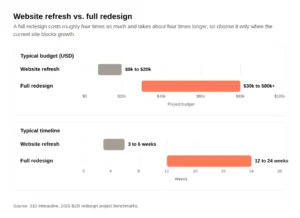
A website refresh is when there is an update in the visual appearance of the website by introducing new colors, fonts, images, and some user experience changes, but with everything else being the same. Redesign, however, is the complete restructuring of the website.
A refresh makes sense when:
- Navigation, mobile responsiveness, and content strategy already work well
- Conversion rates and SEO rankings are stable
- The UI simply looks dated compared to competitors
A full redesign is required when:
- The information architecture confuses users and search engines
- The CMS limits speed, content updates, or integrations
- You need to move from brochureware to a lead-generation focus
- B2B buyers prefer sites that allow self-service and inform before engaging with sales, and your current site does not support that
- You need a new site to support self-service product catalogs, pricing tools, or customer portals
Choosing the right level early prevents unrealistic project scope and budget blowouts. A team expecting a full redesign on a refresh timeline will hit problems fast.
3. Align Stakeholders And Define Project Scope
B2B websites must cater to multiple stakeholders in complex buying processes. Getting alignment before design work begins saves time and prevents painful mid-project pivots.
- Run a stakeholder workshop with sales, marketing, product, customer success, and IT to capture requirements, pain points, and priorities from the current site
- Define which parts of the marketing site are in scope: marketing pages only, blog, resource center, customer portal, knowledge base, or all of the above
- Document out-of-scope items explicitly so no one expects features that were never planned
- Clarify who owns sign-off for content, design, and technical decisions
- Formalize alignment in a one-to-two-page project brief that all sponsors sign off on by a specific date
Using a simple RACI approach (responsible, accountable, consulted, informed) for each major milestone keeps everyone clear on their role without overcomplicating things.
4. Set Clear Business Objectives And KPIs
This is when the business goals can be turned into measurable objectives for the redesigned site. Having measurable objectives will help avoid unnecessary aesthetic changes in a redesign process.
80.8% of all redesigns are motivated by poor conversion rates. This shows that the main objective in most cases of redesigning should be associated with lead or income generation, rather than appearance.
Make sure your goals are specific and time bound:
- “Increase qualified demo requests by 25% in Q1 2027 compared to Q4 2026”
- “Raise marketing qualified leads by 40% in 6 months”
- “Increase organic traffic to product solution pages by 30% in 90 days”
Typical KPIs to track include:
- Marketing qualified leads and sales qualified opportunities from the website
- Conversion rates on core CTAs (demo, quote, free trial)
- Bounce rate on top landing pages
- Time on key pages like product and case study pages
- Page speed and mobile performance metrics
- SEO visibility, keyword rankings, and backlink growth
Do not set objectives such as “make it look more modern.” This should be contrasted with “Update the user interface so as to decrease bounce rate by 15 percent on the home page.” While one of these statements is measureable, the other is not.
Setting goals ties redesign directly to revenue growth. Set up baseline KPIs for all of the metrics that you are going to monitor so as to see how your newly designed website performs after three, six, and twelve months of its existence.
5. Build A Realistic Budget And Timeline
A solid project plan turns goals into actionable tasks, and it starts with an honest budget and timeline. A website redesign typically costs between $2,000 and $80,000, depending on complexity, custom integrations, content production, and the number of stakeholders involved.
Here are realistic ranges for 2027 B2B website redesign costs:
- Visual refresh or template updates: approximately $8,000 to $20,000
- Mid-scope redesign including IA, CMS migration, and content work: approximately $30,000 to $60,000
- Full redesign, repositioning, or enterprise sites: $60,000 to $120,000+
A typical 3-to-6-month timeline breaks into these phases:
- Discovery and audits: 3 to 4 weeks
- Information architecture, UX, and content planning: 3 to 4 weeks
- Visual design and content creation: 3 to 4 weeks
- Development and integrations: 4 to 6 weeks
- Testing, SEO migration, and launch: 2 to 3 weeks
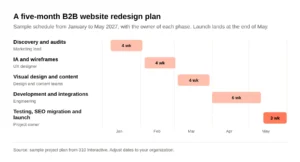 A typical full redesign runs about five months, with development taking the longest single phase.
Common causes of delay include:
- Late content approvals from busy stakeholders
- Changing requirements mid-build (scope creep)
- Content gaps discovered during migration
- Integration complexity underestimated at scoping
Add a 15 to 20 percent contingency in both budget and timeline. New product pages, unexpected technical debt, or a sudden rebrand can all require extra resources.
6. Assemble The Cross-Functional Redesign Team
A successful website redesign needs the right people in the right roles. Here are the core team members and their responsibilities:
- Project owner (senior sponsor): accountable for deliverables, budget, scope, and escalation
- Project manager: owns the day-to-day redesign project plan, timelines, and communication
- UX designer: responsible for information architecture, wireframes, user flows, and prototypes
- Content strategist or copywriter: shapes messaging, value propositions, and produces content
- SEO specialist: handles keyword research, redirect mapping, schema, and technical SEO health
- Front-end developer: implements designs, responsive layouts, and performance optimizations
- Back-end developer: manages CMS setup, integrations, hosting, and security
- Analytics lead: defines tracking, sets up dashboards, monitors key performance indicators
When it comes to complicated B2B purchases, both sales and customer success teams need to give regular feedback on objections, questions, and messages that work well for prospects. Otherwise, the redesign may become unconnected to actual dialogues.
One final decision-maker (CMO or Head of Marketing) needs to be able to make decisions regarding scope, features, and timing of the release.
7. Audit Current Content, UX, And Technical Health
This structured review of the existing site directly informs the redesign roadmap. A website audit identifies high-traffic pages and technical gaps that need immediate attention.
Run a content inventory exercise:
- Classify each page as keep (strong traffic, conversions, up-to-date), improve (decent traffic but needs revision), merge (overlapping or duplicate content), or retire (thin, outdated, low value)
- Prioritize key pages that drive the most lead generation or organic traffic
Review UX elements on top traffic pages:
- Navigation clarity and label relevance
- Search functionality
- Form friction (length, number of fields, mobile usability)
- Clarity of CTAs and content scannability
Complete a technical audit checklist:
- Site speed and Core Web Vitals (LCP, CLS, FID)
- Security posture (HTTPS, vulnerability scans, certificate status)
- CMS limitations (ease of editing, template flexibility, integration support)
- Accessibility compliance (WCAG, alt text, keyboard navigation)
- Broken links and redirect chains
Run a full SEO audit before starting the redesign. Audit findings should directly influence the project scope and help prioritize where the full redesign effort is most needed.
8. Analyze User And Buyer Behavior Data
Use real user data rather than internal opinions to guide the redesign process. What your team assumes about how visitors use the current website often does not match reality.
- Use heatmaps to analyze user behavior on the new site and the old one. Session recordings and on-site polls provide additional context.
- Run funnel analytics to see where visitors drop off during key conversion paths like form submissions, downloads, or demo bookings.
- Gather user feedback through short surveys or exit-intent polls asking what stopped visitors from taking action.
Identify buyer personas to tailor messages and site architecture. Map behavior by persona or buying role:
- Technical evaluators tend to spend time on spec pages, documentation, and integrations
- Economic buyers focus on ROI content, case studies, and the pricing page
- Champions look for materials they can share internally
One surprising insight may be that the pricing page on your website is the number one entrance point for qualified visitors, but the existing navigation scheme leads to it in three clicks. These insights should redefine the navigational priorities on the new site.
These insights will guide the design of the pages and their content hierarchy for all user segments.
9. Clarify Positioning, Messaging, And Content Strategy
This portion of the paper emphasizes what the website says rather than how it appears. Value propositions and calls-to-action need to be clear at an early stage on a homepage because customers need to see within 5 seconds who is helped, how, and why.
- Refine your brand positioning so it speaks to your target audience’s actual pain points, not your internal product names
- Make sure the homepage communicates value in the first screen with proof points, a clear tagline, and benefits that resonate with your ideal customer profile
Build or update a content strategy that supports the full B2B buyer journey:
- Awareness: blog posts, thought leadership, industry guides
- Consideration: case studies, comparison guides, webinars
- Decision: product detail pages, pricing, FAQs, ROI calculators
Align tone of voice, terminology, and proof points with sales decks and proposals. If sales describes the product one way and the website says something different, prospects lose trust.
Build a prioritized content creation backlog. Include pages the current site is missing (industry-specific pages, an ROI calculator, updated FAQs) and link them directly to the redesign project plan. If your team cannot produce these pages on the redesign timeline, B2B content marketing services can fill the gap before launch.
10. Plan Site Architecture And Navigation Around Buyer Journeys
Creating a user-focused sitemap improves navigation and content accessibility. Structure the new site so that awareness, consideration, and decision-stage content maps into a logical site structure that keeps critical pages within three clicks of the homepage.
- Use buyer journey stages to organize content sections (Solutions, Industries, Resources, Company)
- For complex B2B catalogs with many product lines, evaluate mega menus versus simple top navigation versus footer links
- Test proposed navigation labels with real users or internal salespeople to avoid jargon that prospects will not understand
- Plan URL structure and breadcrumb logic so future sections (new products, new markets) can be added without breaking the system
- Consider how existing customers will find support resources, documentation, and portals they currently rely on
The site structure should make it easy for both users and search engines to find and understand your content. A flat hierarchy with clear labeling outperforms deep, nested structures almost every time.
11. Define Requirements For Platform, Integrations, And Tech Stack
This is where business needs translate into platform and integration choices for the new site.
Common integration requirements for B2B sites:
- CRM sync (Salesforce, HubSpot, etc.)
- Marketing automation for lead scoring and nurturing
- Analytics tools (GA4, BI dashboards)
- Chat and conversational tools
- Account-based marketing and personalization engines
- Content management with modular, reusable components
Check if the existing CMS is able to accommodate your next 3 years of growth. In case it cannot handle the number of pages, speed, multilingual functionality, and integrations that you require, migration must become a part of your website redesigning project.
The must-have elements of your new platform:
- Mobile responsiveness
- Security (SSL, regular updates, backup plan)
- Editor friendliness so marketing can update content without developer help
- Core functionality that supports your lead generation model
Create a requirements table where each integration is marked as must-have or nice-to-have so developers can scope accurately and provide costed options.
12. Create Wireframes And Prototype Key Flows
Before visual design begins, turn strategy into low-fidelity layouts. Design wireframes to establish content hierarchy and user flow before visual design to catch structural problems early and cheaply.
- Wireframe high-impact pages: homepage, solutions or product pages, pricing page, and lead capture forms
- Outline key user flows: book a demo, download a whitepaper, request a quote
- Represent these flows in click-through prototypes that simulate the experience on both desktop and mobile
Testing the prototype with internal team members as well as a limited number of target audience members helps in finding out CTA labeling errors, navigation issues, lack of information, and mobile usability issues that are costly to address in future.
The prototype design must be device independent and there has to be a specific focus on how it would work for mobile devices as well as desktop computers. More than 60% of traffic to websites is mobile traffic.
13. Design For Clarity, Credibility, And Conversion
Whether you design in-house or with B2B web design services, visual decisions should connect directly to business objectives like improved conversion rates and trust. Websites with superior user experience achieve 400% higher conversion rates, so design is not decoration. It is a revenue lever.
Build a UI style guide:
- Color palette, typography, spacing, button styles, and components that reflect your B2B brand
- Consistent patterns that speed up development and maintain visual clarity across every page
Include credibility elements prominently on core pages:
- Logos of existing customers
- Industry certifications and awards
- Case studies with quantified results (“Reduced onboarding time by 60%”)
- Testimonials from recognizable companies
Design clear CTAs and scannable content blocks:
- Use action verbs on buttons (“Get a demo,” “See pricing”)
- Break content into short paragraphs, bullet lists, and visual sections
- Avoid overwhelming visitors with dense text walls
Responsive layouts must keep hierarchy and clarity intact on phones and tablets, not just large desktop monitors. Poor design on mobile drives away potential customers who may never return.
14. Ensure Mobile Responsiveness And Performance From Day One
Mobile responsiveness and performance affect both user experience and SEO for the new site. 64% of web traffic comes from mobile devices, which means your redesigned site must work flawlessly on smaller screens.
- Design mobile-first layouts, then scale up to tablet and desktop while maintaining readable text and tappable buttons (minimum 44 to 48 pixels)
- Test navigation, forms, and interactive components on real devices, not just browser emulators
A slow website loses customers. Aim for under 3 seconds load time on all core pages. Performance improvements to consider:
- Image optimization with lazy loading and modern formats like WebP or AVIF
- Limiting heavy scripts and deferring non-critical CSS and JavaScript
- Using a fast hosting infrastructure and CDN
- Monitoring slow sites and addressing bottlenecks before they impact mobile users
Speed enhancement has an impact on conversion. As small as even 0.5 seconds of improvement in page loading time could have a positive effect on lead generation through forms. Page speed and mobile-friendliness should be tested in all page templates.
15. Plan SEO And Analytics Before Development Starts
SEO and analysis should be built into the design process upfront instead of being tacked on later. An SEO audit ensures that the site’s SEO strength is not compromised and that traffic is not lost.
Start with these tasks:
- Keyword research based on current search rankings and target terms your competitors rank for
- On-page optimization plans including title tags, meta descriptions, heading structure, and structured data considerations
- Build an SEO asset inventory of top-performing URLs, backlinks, and content so nothing critical is lost during migration
For analytics, define requirements in advance:
- Event tracking for form submissions, downloads, video plays, and chat interactions
- Goals aligned with the KPIs you set in step 4
- Dashboards that marketing and leadership will actually review
Your SEO strategy along with the data analytics should be written down for the developers to implement it. It is necessary that the developers have these facts at their disposal while coding your website, not afterwards.
16. Develop, Integrate, And Migrate Content Safely
This is the build phase where designs become a functional new website.
- Set up the new site in a staging site connected to required systems like CRM, email platforms, and analytics
- Test all integrations in staging before touching the live site
For content migration:
- Prioritize high-value pages (those with strong organic traffic, backlinks, and conversion rates)
- Keep URLs where possible. If changes are necessary, document every change for the redirect map
- Rewrite content only when necessary for clarity, positioning, or accuracy
- Preserve metadata and structured data during migration to maintain SEO value
Handle legacy assets carefully:
- PDFs, spec sheets, and downloadable resources that existing customers rely on should remain accessible or be properly redirected
- Document all integration settings, custom modules, and third-party tools so future ongoing maintenance and future redesign process cycles are easier
17. Quality Assurance, Testing, And Pre-Launch Checklist
Before switching from the current site to the new site, run structured QA across every critical area.
Functional tests:
- All forms (contact forms, demo requests, downloads) submit correctly and route to the right systems
- Search, navigation, login areas, and error messages work across Chrome, Safari, Edge, and Firefox
- Form submissions trigger expected confirmation emails and CRM records
SEO-specific checks:
- Page titles, meta descriptions, and canonical tags are correct on every page
- Schema markup and structured data are implemented where planned
- Robots directives (robots.txt, noindex tags) are set correctly
- Internal links point to live pages with no broken links
Performance tests:
- Run speed tests on staging for mobile and desktop
- Resolve issues that could slow down the new site before launch
Build a final pre-launch checklist that must be signed off by the project owner, marketing lead, and IT by the defined go-live date. Nothing goes live without that sign-off.
18. Launch Strategy, Redirects, And Immediate Monitoring
Launch is a controlled event, not just flipping a switch. A redesign can erase years of SEO progress if mishandled, so treat launch day with the seriousness it deserves.
Steps for a clean launch:
- Choose an off-peak launch window (lower traffic hours or days)
- Back up the current site completely
- Update DNS or hosting settings in a defined sequence with a clear rollback plan
Create a comprehensive 301 redirect map during redesign. Map every indexed old URL to its corresponding new URL. A comprehensive 301 redirect plan is essential during redesigns. Without it, research shows that sites can lose 50% or more of organic traffic on key pages immediately after launch.
Immediate post-launch checks in the first 24 to 72 hours:
- Monitor traffic and conversions in the first 72 hours post-launch
- Monitor for crawl errors in the first 72 hours post-launch
- Check error logs for server 500s and unexpected 404s
- Verify all lead forms and critical conversion paths are working
- Submit the new sitemap to Google Search Console after launch
Review analytics and Search Console daily for at least the first week to catch indexing or tracking issues early. Watch for any drop in search visibility on key pages.
19. Measure Impact And Optimize In The First 90 Days
The first three months post-launch are critical for performance monitoring. This is when you validate whether the redesign is moving business objectives in the right direction.
Compare the redesigned site’s performance against the documented baseline:
- Website traffic by channel (organic, paid, referral, direct)
- Conversion rates on core CTAs
- Lead quality as reported by sales
- Page speed improvements
- SEO rankings for priority keywords
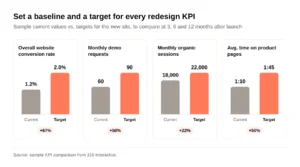 Record a baseline for each KPI before launch so you can measure the redesign at 3, 6 and 12 months.
Watch out for changes in SEO rank of top 50 keywords after redesign. Analyze results by important personas, device and source of traffic to see which areas are working or failing with your new website.
Good website redesigns can result in a boost in conversion rate of 100% to 400%, but to do so, one needs to monitor their success.
Schedule regular analysis sessions:
- 30-day review: initial traffic and conversion data, bug fixes, user feedback collection
- 60-day review: deeper analysis of lead quality, SEO recovery, behavior patterns
- 90-day review: full comparison against KPIs, decision on next optimizations
A/B test pricing and CTAs to improve conversions continuously. Feed findings back into ongoing content strategy, UX refinements, and digital marketing efforts.
20. Treat The Website As An Ongoing Growth Platform
A B2B website redesign is not a one-time event. Websites should be updated every 2 to 3 years to stay relevant, but between major redesigns, continuous optimization post-launch involves monitoring user behavior and key metrics.
- Set up a quarterly optimization backlog for experiments, new content initiatives, and technical improvements
- Regularly update content and monitor for continued relevance and performance
- Run user research periodically to understand how the target audience interacts with the site differently over time
Governance matters:
- Assign clear ownership for content updates, security patches, and design consistency
- Define who can publish new pages and who reviews them for brand and SEO alignment
Do a light audit on an annual basis to check the state of SEO, UX, and analytics so that you know whether you need a site refresh or overhaul in the future. Make sure that all future site updates match business needs and products launched in the meantime.
Mapping Current To New KPIs
Below is a sample KPI comparison table that helps you document where you are now and where you expect the redesigned site to perform. Use this format in stakeholder discussions to show everyone what success looks like.
Sample KPI Comparison Table
| Metric | Current Value | Target For New Site | Notes |
| Overall website conversion rate | 1.2% | 2.0% | Focus on improved CTAs and simplified forms |
| Monthly demo requests | 60 per month | 90 per month | Align messaging to core ICP segments |
| Organic sessions | 18,000 per month | 22,000 per month | Preserve SEO and add new targeted content |
| Avg time on product pages | 1:10 | 1:45 | Deeper content and clearer feature explanations |
Refresh Vs Full Redesign
Not every site needs a ground-up rebuild. Use this comparison to determine whether a strategic redesign or a lighter approach fits your situation. All figures reflect realistic 2027 project benchmarks.
Website Refresh Compared To Full Redesign
| Aspect | Website Refresh | Full Redesign |
| Typical scope | Visual updates, minor UX tweaks, limited content edits | New IA, design system, templates, content strategy, and CMS architecture |
| Estimated timeline | 3 to 6 weeks | 12 to 24 weeks |
| Common budget range (USD) | 8,000 to 20,000 | 30,000 to 80,000+ |
| Impact on SEO | Low risk, minimal URL changes | High impact, requires full redirect and SEO migration plan |
| When to choose | Brand looks dated but current website converts well | Current site blocks business growth, has poor UX, or outdated tech stack |
Additional Data Table: Project Plan Milestones
Below is a sample redesign project plan spanning approximately 5 months. Adjust dates to fit your organization, but keep the phase structure to maintain momentum.
Sample Redesign Project Plan
| Phase | Planned Start | Planned Finish | Primary Owner |
| Discovery and audits | 8 January 2027 | 2 February 2027 | Marketing lead |
| Information architecture and wireframes | 5 February 2027 | 1 March 2027 | UX designer |
| Visual design and content creation | 4 March 2027 | 29 March 2027 | Design and content teams |
| Development and integrations | 1 April 2027 | 10 May 2027 | Engineering |
| Testing, SEO migration, and launch | 13 May 2027 | 31 May 2027 | Project owner |
FAQ
How often should a B2B company redesign its website?
Most companies engaging in B2B marketing should think about a major redesign once every 3 to 5 years, but minor iterations should take place quarterly. Redesign can be needed sooner in case there is a dramatic change in product lines, branding, or there has been a consistent reduction in conversion rate. Redesign should be based on performance statistics and company’s strategic vision, not just current design trends.
Do we need to redesign our website if we are switching CRMs or marketing automation tools?
Core system changes do not necessarily mean redesign but could involve changes in backend systems, templates, and lead flow scoring processes. Take this chance to see if your existing website meets your reporting and lead generation requirements. In addition to this, take this chance to at least perform a quick usability and content review during the platform change.
How can we avoid losing leads during the transition from the old site to the new site?
Ensure that all lead generation forms, chat, and tracking are properly tested on the staging site prior to launch day. You may want to consider running a soft launch where a certain number of your visitors are shown the new version of the website and you have a chance to rectify any problems prior to fully cutting over. Lead flow and errors on the lead generation forms should be tracked each day for at least two weeks after launch.
What should our sales team do differently once the new website is live?
Short-term promotional campaigns around the refined messages, navigation, and materials to ensure they feel comfortable directing prospects to the correct web pages. It would be a good idea for them to collect some user feedback from prospects regarding their experience on the new site via their initial outbound phone calls and demonstrations.
Is it better to launch the entire new site at once or in phases?
Phased rollouts work best where the current site is sound and you wish to minimize risks through gradual releases. A complete rollout at once is better in situations where the current site is damaging your brand positioning or where there have been many architectural changes that cannot be divided into parts. Make the decision on the basis of the size of your project, its level of technical difficulty, and your team’s ability to handle any issues that arise after each rollout.